Browse all guides
Automatic discounts: “spend RM100, get 10% off” with no code
Give customers a discount automatically when their cart reaches an amount, with optional start and end dates.
An automatic discount needs no coupon code: when the cart reaches the amount you set, the discount is applied by itself. The cart even tells the shopper how much more to add. A customer gets either an automatic discount or a coupon, whichever saves them more — never both on the same order. Automatic discounts are part of Starter (a Starter trial includes them); on the Free plan existing ones are kept but stop applying.
- 1
Open Promotions → Automatic discounts
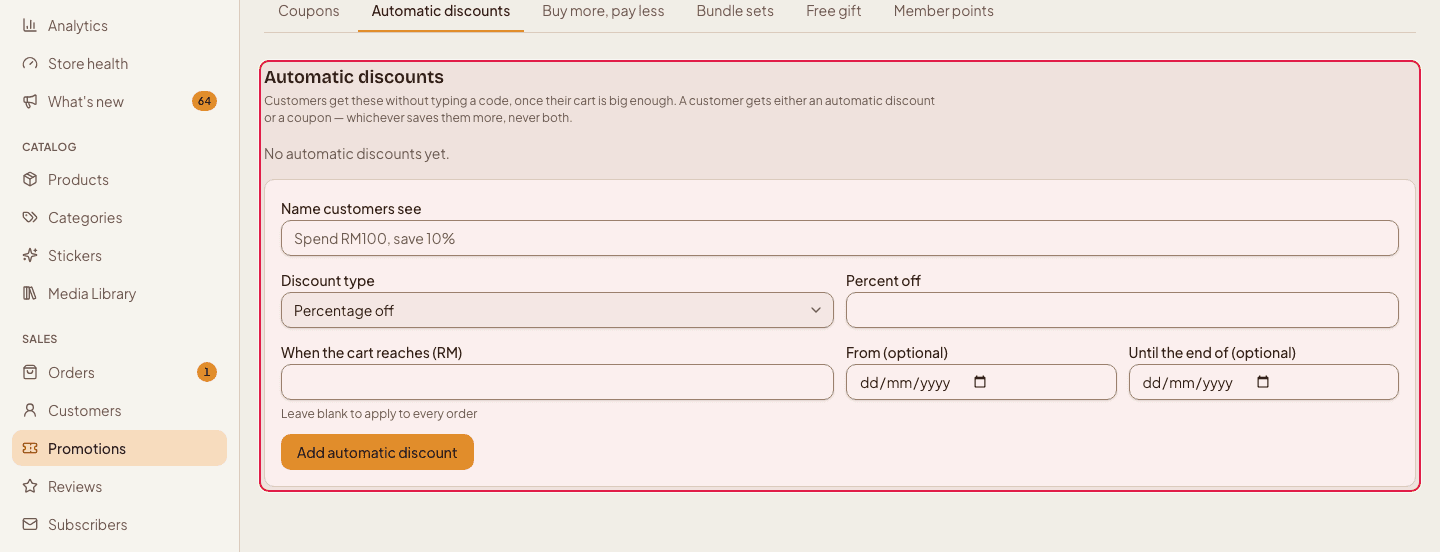
Click Promotions in the left menu, then the Automatic discounts tab.
- 2
Name it
Type the name customers will see in their cart and at checkout, for example “Spend RM100, save 10%”.

- 3
Set the amount and the percentage
Enter “When the cart reaches (RM)” (leave blank to apply to every order), choose the Discount type (percentage off or a fixed amount off) and its value. For example 100, percentage and 10 means 10% off once the cart reaches RM100.
- 4
Optional: set the dates
Fill in From and Until the end of to run it as a short sale. It switches on at the start and off by itself after the last day.

- 5
Add it
Press Add automatic discount. Use Turn off to pause one, or delete it when it is no longer needed.
Automatic discounts are worked out after “Buy more, pay less” and combo prices, on what is left of the cart.
Still stuck?
Contact us and we'll help you sort it out.